learn more
How aime actually works
No jargon, no roadmap slides. This is what the switch does, what happens to your data, and how the memory underneath it all works.
what it does
One switch. Two ways to work.
Everything else about aime follows from that one decision.
One switch, that's the interface
Offline for private and free. Online to get real work done. Nothing else to configure.
Tap to expand ›Slash commands still work in Online mode. They pass straight through to your online AI provider, same as typing them there.
⌨️ Slash commands pass throughGive it a goal, it keeps going
Tell aime what you want done. It works on it by itself, on a schedule, until it's finished.
Tap to expand ›Every step shows up as an ordinary chat message, and results are saved as real files. Pause, resume, or delete it anytime from the Goals list.
🎯 Online mode onlyOffline talks to your own machine
A small model runs through Ollama, right on your computer. No internet required, no account needed.
Tap to expand ›Install a model from Settings with one click. You'll see real download progress, no terminal needed.
📥 One-click model installerOnline hands the chat to your AI
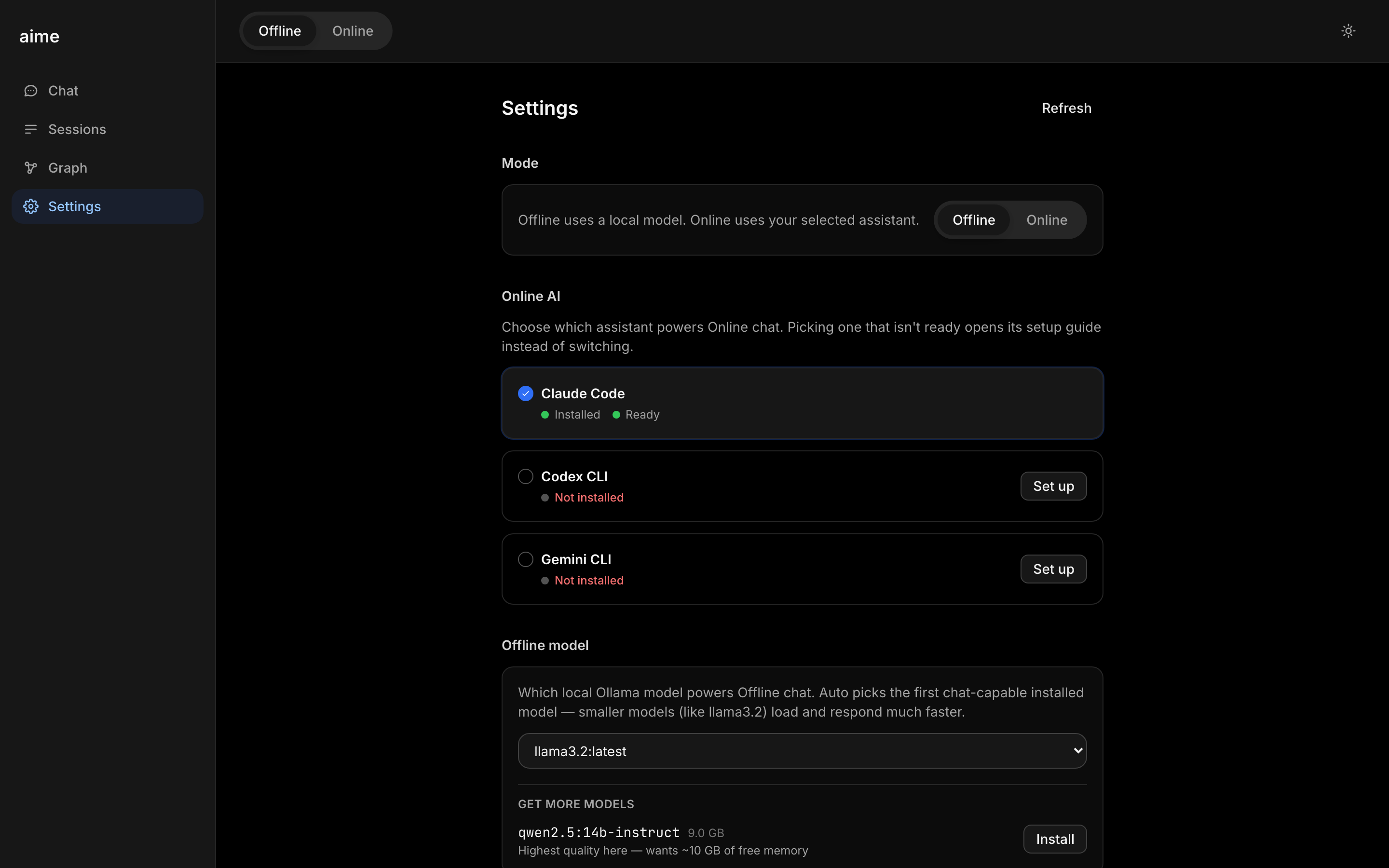
Flip the switch and the same conversation goes to a real session with your chosen online AI. Claude Code, ChatGPT, or Gemini, whichever you prefer, plug into the same socket.
Tap to expand ›It can run real commands and create real files: a PDF, a script, a cleaned-up CSV or Excel sheet. Upload a messy file and ask it to fix it.
📄 Real, downloadable filesRemembers you, quietly
It notices what's worth keeping from a conversation and saves it as a memory, automatically.
Tap to expand ›No forms, no tagging. Just talk, and the useful parts stick around on their own.
💾 Memory lives on your diskDraws what it remembers
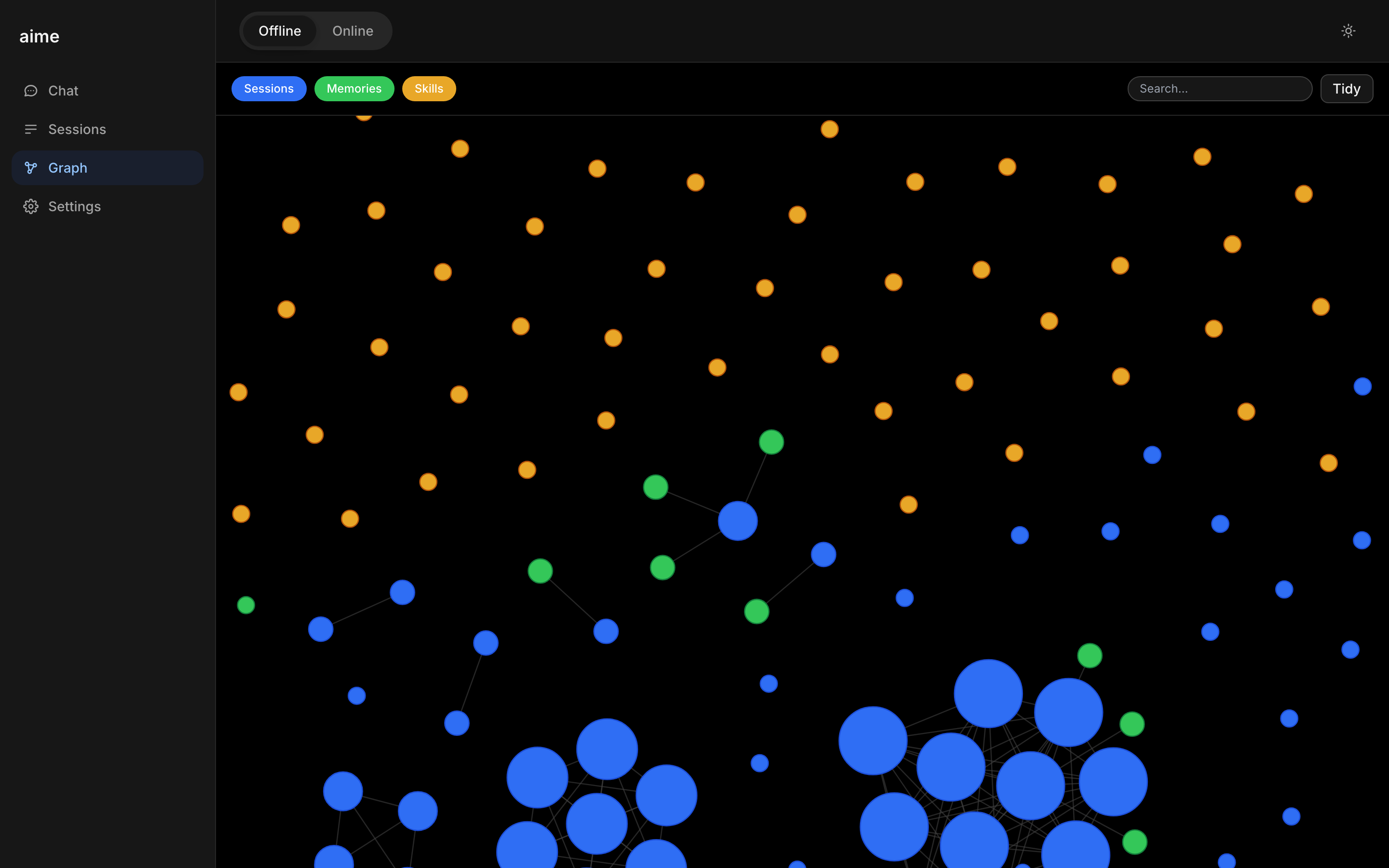
Every session, memory, and skill shows up as a dot on an interactive map called the Graph.
Tap to expand ›Drag it around, click a dot to see what's inside. A Tidy button finds duplicates and merges them once you approve.
🧹 Tidy merges duplicatesFollows you to your phone
Pair your phone over your own wifi with a link aime prints for you. No cloud relay in between.
Tap to expand ›Native Mac and iPhone apps are already working. TestFlight is pending Apple's approval. Replies are formatted in Markdown so they're easy to read anywhere.
🍎 Mac + iPhone appsnew: goals
Set a goal, then get on with your day
Tell aime what you want done, in plain language. It keeps working on it by itself, on a real schedule, until it's finished.
Ask in plain language
Describe what you want done, right in the chat. No new app to learn, no project to set up first.
It runs on a schedule
Every 30 minutes by default, aime runs a real session with your chosen online AI and takes one concrete step forward.
Every step is an ordinary message
Nothing happens in a black box. Each step shows up in the chat exactly like a message from you.
Safety rails, built in
There's a cap on how many steps it can take, so a stuck goal can't run forever. Pause, resume, or delete it anytime from the Goals list on the Sessions page.
It stops on its own once the work is done, saving the results as real, downloadable files. Goals runs in Online mode, since each step is a real session with your chosen online AI.
see it for yourself
Real product, not a mockup
Every screenshot and clip below is aime running on an actual machine.
Offline: a small model on your own machine answers, streaming in real time. No internet needed.
Online: the same chat, handed to your online AI, writes a real file you can download.

your privacy
What actually leaves your machine
Not a policy document. Just the truth, in two sentences.
Offline mode: nothing
Nothing leaves your device. The model runs on your machine, your conversation stays on your machine, and there's no internet connection involved at all.
Online mode: that one conversation
Flip to Online and that chat is sent to whichever online AI you've set up, Claude Code, ChatGPT, or Gemini. Nothing else changes, and you can flip back anytime.
memory & the map
A memory you can actually see
Most AI forgets you, or remembers you in a black box. This one shows its work.
It listens for what matters
After a conversation, aime quietly checks whether anything is worth remembering, like a fact about you, your projects, or your preferences.
It draws a map
Every session, memory, and skill becomes a dot on the Graph. Blue for conversations, green for memories, amber for skills. You can drag it around and click into anything.
Tidy keeps it clean
Memory gets messy over time, the same way your own notes do. Tidy finds near-duplicates and proposes a merge, but only acts once you approve. Nothing is deleted, old versions are archived.
yours, not theirs
Switch vendors. Keep your memory.
Most AI tools use memory to keep you. This one uses it to set you free.
Saved as plain files
Everything lives in a folder on your disk. Open it, back it up, move it yourself. It's not a database you can't see.
Vendors are just plug-ins
Claude Code is the default Online provider. ChatGPT and Gemini plug into the exact same socket.
Switch anytime, memory comes too
Move to a different vendor tomorrow and your whole history is still there. The memory was never theirs to keep.
"The memory is yours. Switching vendors doesn't erase you."
questions
Honest answers
No jargon, no fine print.
Is it free?
aime itself is free. Offline mode costs nothing beyond running it on your own computer. Online mode uses your own Claude Code, ChatGPT, or Gemini account, so you pay whatever that vendor charges you, if anything.
What do I need?
A computer to run it on. For Offline chat, Ollama with a model installed, and aime can install one for you. For Online chat, a Claude Code, ChatGPT, or Gemini account. Neither is required to try the other mode.
Does offline really work on a plane?
Yes. Offline mode never touches the internet. The model runs on your machine, so it works anywhere your laptop does, wifi or not.
What happens to my data?
In Offline mode, nothing leaves your machine. In Online mode, that one conversation goes to the AI vendor you picked, the same as using their app directly. Your memory, either way, is saved as plain files on your own disk.
Do I need to make an account?
Not with aime. You might sign into Claude Code, ChatGPT, or Gemini separately if you want Online mode, since that's whose AI is doing the work.
Is there a phone app?
Native Mac and iPhone apps are already working. Public App Store access is pending TestFlight approval. In the meantime you can pair your phone over your own wifi. See the getting started guide.
ready?
Let's get you started
Drop us a note and we'll reach out to help you get set up personally.
Get early access →